(4) Using PrairieLearn
Due: Tuesday, September 8
In this tutorial, we’ll practice using PrairieLearn and see how the scoring system works. Before completing this tutorial, please make sure you’ve signed up for PrairieLearn as described in the Course Tools Registration page.
1 PrairieLearn Welcome Assessment
Go to our course PrairieLearn page. You should see a PrairieLearn Tutorial assessment. (Ignore the PrairieTest Tutorial assessment for now - that’s for a later tutorial.) Click on the “PrairieLearn Tutorial” assessment to open it. You should see something like this:
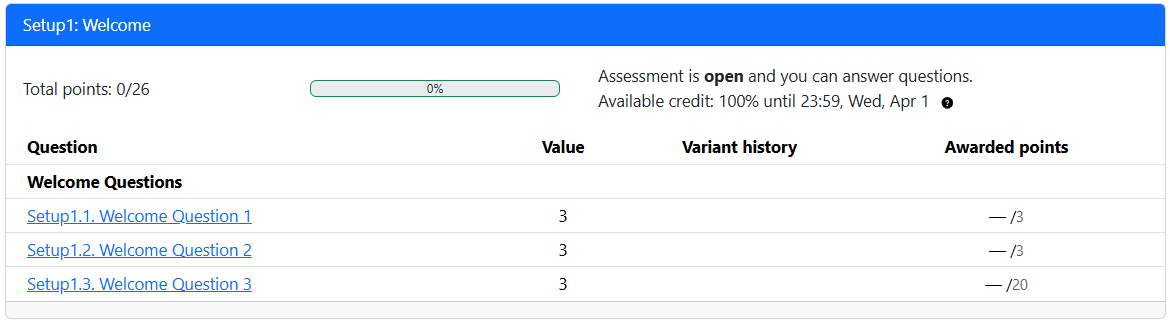
Nothing you do in this assessment will hurt your grade at all! This is just for practice.
1.1 Question 1 (no variants; earn points once)
Click on the first question. You should see something like this:
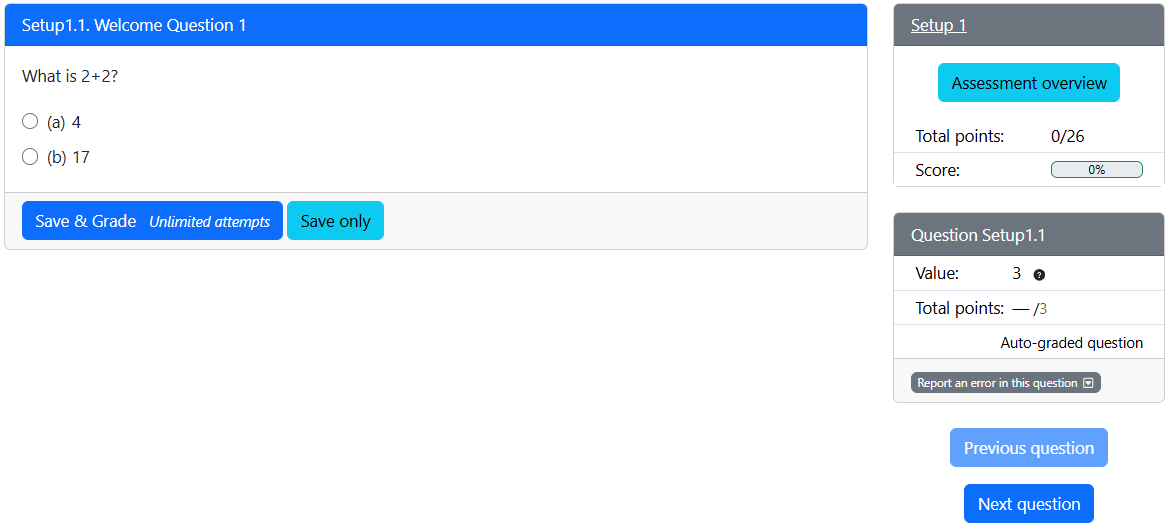
- Note the question in the left/main area. In the upper-right you can see that the assessment (the three questions combined) is worth 26 points, and you currently have 0 / 26. Below that, still on the right, you can also see that this particular question has a value of 3, and you currently have – / 3 for this question.
- Just to see what happens, choose “17” and click “Save & Grade”. You’ll be told you got the question wrong and your total points for the assessment and this question are still 0.
- Change your answer to 4, hit “Save & Grade” again, and observe that you got it right and your total points for the assessment and this question are now 3.
- Click the “Next question” button on the right to go to question 2.
Always click “Save & Grade” – never just click “Save” by itself.
“Save” makes it so that you can leave the page and come back, and your answer is there. But it does not submit your answer for grading. If you only click “Save” for a problem (and never “Save & Grade”), you will get no points for it. If the due time for a PrairieLearn homework assignment passes and you still have items for which you only saved, you will not get points for those items.
Note that “Save & Grade” already saves your answer too; you don’t need to click “Save” first. Just always click “Save & Grade”.
Also note that PrairieTest (for exams) behaves slightly differently than PrairieLearn for homework assignments! You’ll learn about that in the PrairieTest tutorial later.
1.2 Question 2 (variants; earn points once)
If you did question 1 as above, you should see something like this (likely with different numbers) for question 2:
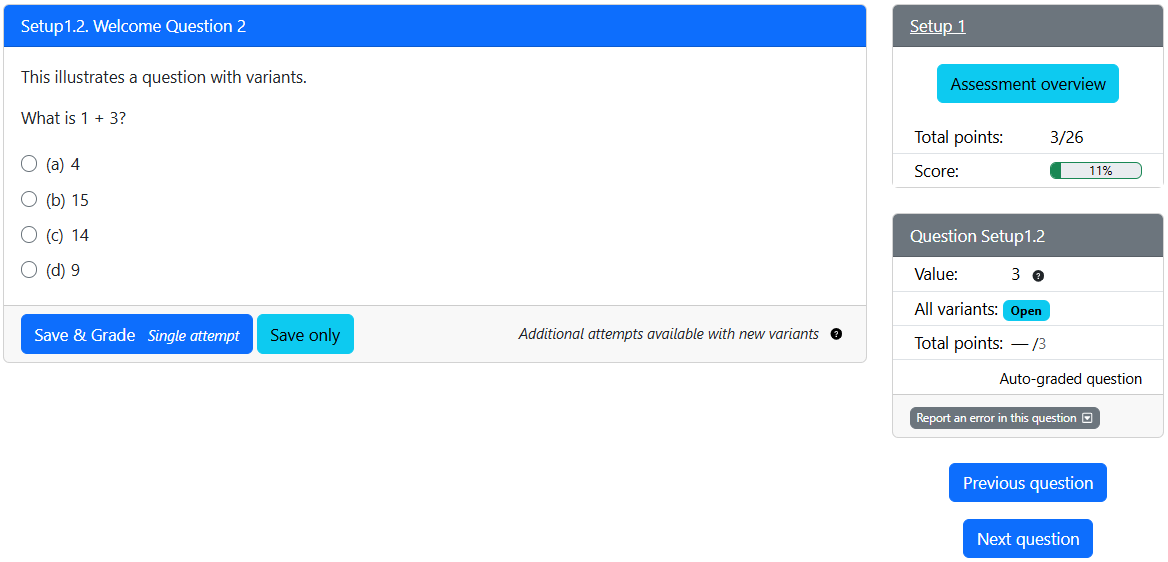
- Note that your total points is now 3 / 26 for the assessment, because you answered question 1 correctly. For question 2, you can see that its value is 3, and you currently have – / 3.
- Choose an incorrect answer and click “Save & Grade”. You’ll then see a “Try a new variant” button. Click it and a new version (variant) of the question will appear. You get to try again to earn the points with this variant.
- Answer the question correctly. You will receive the points for the question. You should see “Total points: 6/26” for the assessment as a whole, and “Total points: 3/3” for question 2.
- You can still click “Try a new variant” to practice some more, but no more points will be awarded. Points are never taken away either.
- Click “Next question” when you’re ready to move on to question 3.
1.3 Question 3 (variants; mastery-based scoring)
If you’ve been following this tutorial sequentially, you should see something like this (again, likely with different numbers) for question 3:
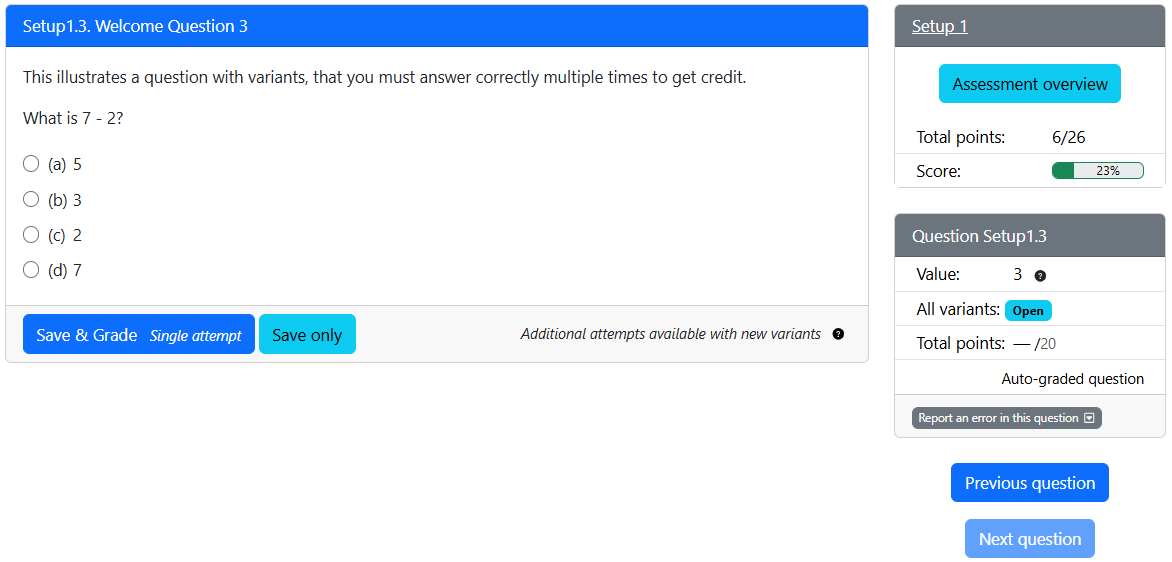
This question has variants, and you can (and should) earn points multiple times. Observe:
- On the right, the text “Value: 3” indicates that you can earn 3 points for answering this variant of the question correctly.
- Also note “Total points: – / 20” for this question, indicating the question (across its many variants) is worth a total of 20 points. So you’ll need to answer several variants correctly to earn the full 20 points.
- Go ahead and answer incorrectly for a couple variants. Observe that your points don’t rise.
- Answer correctly once. Your total points for the assessment should now be 9/26, and your total points for this question should be 3/20. Also note that the “Value” on the right is now 6! Try a new variant.
- Answer correctly again. Your total points for the assessment should now be 15/26, and your total points for this question should be 9/20. Also note that the “Value” on the right is now 9! Try a new variant.
- Answer incorrectly. You don’t lose any points. For all PrairieLearn questions, you will never lose points you’ve already earned! But when you try a new variant, the “Value” on the right is reset back to 3.
- Keep this up as you please, until you’ve achieved the full 20 points for the question, and thus 26/26 for the assessment as a whole.
This is called mastery-based scoring:
- If you’ve mastered a concept and can consistently answer the questions correctly, you probably don’t need lots of practice on it. Thus, the above system will give you more points for each consecutive correct answer, and you’ll get to the maximum quickly.
- If you’re struggling with a concept, that’s ok! This is all for practice. Ask for help as needed, and keep trying until you get full points and feel confident in the concept. The scoring system will give you fewer points per correct answer until you start getting questions right more consistently.
2 PrairieLearn Assignments
We have two kinds of PrairieLearn assessments in this course:
- C01 through C24
- These are sets of multiple choice questions that we’ll do in class.
- C02 is for lecture Lec02, etc. (“C” for class.) A few lectures do not have in-class assessments.
- They’ll only be available during class time, and you’ll get credit for completing them during class in person. Remote options are not available.
- You’ll have limited attempts on these, but they’re intended to be easy points for everyone in class. Open neighbors, open notes, asking me is all encouraged.
- This is where your attendance grade will come from.
- See syllabus for details.
- Post01 through Post24
- There are sets of questions (multiple choice, fill-in-the-blank, short-answer, and coding) to be done post-lecture.
- Post02 is for after lecture Lec02, etc. A few lectures do not have post-class assessments.
- Many of these questions will have variants and will be scored like welcome question 3. Others will be like welcome question 2 and 1.
- With enough engagement with the material and practice, you will have the opportunity to get full credit on all of these questions. This is for your practice and learning!
- To be most prepared for lecture N (where N=03, 04, … or 24), I recommend you do Post[N-1] before lecture N meets. For example, do P05 before L06 meets. For precise due dates, check the schedule.
3 PrairieLearn Summary
- Some questions are exam-like: For Post01 through Post24, some questions are meant to get you up to speed on a topic after the corresponding lecture. Some questions are more difficult and representative of some of the questions you’ll see on an exam.
- Answer questions in any order: You may complete an assessment’s questions in any order you wish, though they are loosely designed to be done in order.
- You can stop and come back: You don’t have to do an assessment all in one sitting! You can close your browser, use a different computer, whatever. Your progress is always saved.
- Scoring varies: Check each question to see if it’s a mastery-based scoring question, or just a “get it right once” question. Go for full points on all questions!
- Once earned, points are never lost: You can always try more variants with no risk. Do so!
- Check the Assessment Overview: For a summary of points earned and remaining points for an ongoing summary: look at the main page of the assessment, or click “Assessment Overview” in the upper-right when looking at a question.
- Watch the due time: Make sure you finish before 11:59 PM (US Eastern Time) on the due date listed on the schedule.
4 Copyright and Intellectual Property Notice
© 2026 Steven Bogaerts. All rights reserved.
All materials provided for this course, including but not limited to labs, projects, notes, and starter code, are the copyrighted intellectual property of the author(s).
- Student Use: These materials are provided solely for the educational use of students currently enrolled in this course at the University of Michigan - Ann Arbor. Students may not copy, reproduce, republish, or distribute these materials (in part or in full) to any public or private platform.
- External and Instructor Use: No part of these materials may be used, adapted, or distributed by external instructors or institutions without the explicit written permission of the author(s).
To request permission to use or adapt these materials for educational purposes, please contact the author(s).